Reprogramming your Hunter fan remote is the essential step to re-establish communication when your fan and remote aren’t responding to each other, especially after a battery change, power outage, or a remote reset. This process, often involving a sequence of power cycles or pressing specific ‘learn’ buttons, creates a fresh connection, ensuring your remote can reliably control your ceiling fan’s functions like speed, light, and direction. Understanding the correct method for your specific Hunter remote and fan model is key to restoring seamless comfort control.
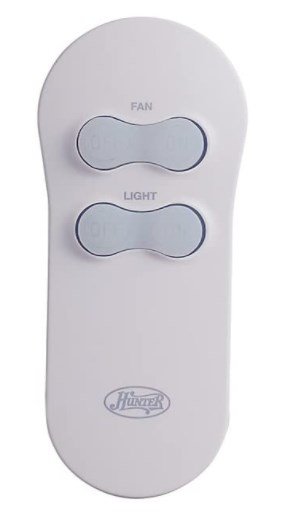
When You Need to Reprogram Your Hunter Fan Remote
While a simple Hunter Fan Remote Reset can resolve minor glitches, reprogramming is a more comprehensive step often required to re-establish a stable connection. You’ll typically need to reprogram your Hunter fan remote in these situations:
- After Replacing Remote Batteries: Even with new batteries, the remote might lose its paired signal, requiring a fresh connection.
- Following a Power Outage: Power surges or prolonged outages can sometimes disrupt the fan’s receiver memory.
- After a Remote Reset: A reset often clears the remote’s memory, necessitating reprogramming to pair it anew with the fan.
- Installing a New Remote Control: Any new remote, even a replacement for an existing one, needs to be programmed to your fan’s receiver.
- Installing a New Hunter Ceiling Fan: The remote included with a new fan needs to be paired for the first time.
- Erratic Fan Behavior: If your fan is turning on/off randomly, changing speeds without command, or the light is flickering, reprogramming can often resolve these communication issues.
- Interference Issues: In rare cases, strong interference from other devices might necessitate reprogramming to find a clearer signal channel.
Preparation is Key: Before You Begin Reprogramming
Before you dive into the reprogramming steps, a little preparation can save you time and frustration. Taking these preliminary actions will ensure you have everything ready for a smooth process:
- Safety First: Turn Off Power: Always begin by turning off the power to your ceiling fan at the circuit breaker. This is crucial for your safety, especially if you need to access the fan’s canopy for dip switches or a ‘learn’ button.
- Check Your Remote Type: Hunter fans use different types of remotes and receivers. Older models often use physical “dip switches” inside the remote and the fan’s receiver. Newer models usually rely on a ‘learn’ button synchronization. Knowing your model type helps determine the correct method.
- Locate Your Fan’s Receiver: The receiver is the small electronic box installed inside the fan’s canopy (the cover against the ceiling). You might need a ladder and a screwdriver to access it, as it contains the dip switches or ‘learn’ button.
- Fresh Batteries: Ensure your remote has fresh batteries. A low battery can cause programming failures.
Expert Insight: Many issues that appear to be programming failures are actually due to old batteries or power not being completely cut at the breaker. Always double-check these simple steps first!
Step-by-Step Reprogramming Guide (Common Methods)
Hunter fans utilize a few primary methods for remote reprogramming. Identify which method applies to your fan/remote combination and follow the steps carefully.
Method 1: Dip Switch Reprogramming (Older Models)
This method involves setting matching codes on both the remote and the fan’s receiver unit.
- Cut Power to Fan: Turn off the circuit breaker for your fan.
- Access Remote Dip Switches: Open the battery compartment on your remote. You’ll see a series of small switches (usually 4 to 8).
- Access Receiver Dip Switches: Carefully lower the fan canopy. Locate the receiver box inside. It will also have a set of dip switches.
- Match Codes: Using a small pen or screwdriver, ensure the dip switches on both the remote and the receiver are set to the exact same pattern (e.g., if remote is 1-on, 2-off, 3-on, receiver must be the same). You can change the pattern if you suspect interference from a neighbor’s fan.
- Restore Power: Secure the receiver back in the canopy and turn the circuit breaker back on.
- Test: Your fan remote should now be reprogrammed. Test all functions.
Method 2: ‘Learn’ Button Reprogramming (Newer Models)
Newer Hunter remotes often use a ‘learn’ button for synchronization, making the process simpler as there are no physical switches to match.
- Cut Power to Fan: Turn off the circuit breaker for your fan for at least 30 seconds to a minute.
- Restore Power: Turn the circuit breaker back on.
- Press ‘Learn’ Button on Remote: Within 60 seconds of restoring power to the fan, press and hold the ‘Learn’ button on your remote control for approximately 3-5 seconds. This button is often located in the battery compartment or on the side of the remote. You might hear a beep from the fan or see its light flash, indicating successful pairing.
- Test: Immediately test your fan’s functions with the remote.
Method 3: Power Cycle Reprogramming (Select Models/Universal Remotes)
Some remotes, particularly universal ones or specific Hunter models, can be reprogrammed solely through a power cycling sequence without needing to access the receiver.
- Cut Power to Fan: Turn off the circuit breaker for your fan for a full minute.
- Restore Power: Turn the circuit breaker back on.
- Quick Power Cycle (Optional): For some models, you may need to quickly turn the fan’s wall switch (if applicable) OFF and ON twice within 5 seconds.
- Press Fan Speed Button: Within a short window (typically 30-60 seconds) of the final power restoration, press and hold the “Fan Speed” button (or the “Light” button on some models) on your remote for 5-10 seconds. The fan or light may blink or cycle through speeds to confirm.
- Test: Test all remote functions.
Troubleshooting Reprogramming Issues
If your Hunter fan remote still isn’t working after attempting to reprogram it, don’t despair. Here are some common troubleshooting steps:
- Double-Check Batteries: Always, always ensure the remote has fresh, correctly inserted batteries. This is the most common oversight.
- Verify Power Cycle Timing: The 30-60 second window for pressing the ‘learn’ button or initiating the power cycle sequence is critical. Be precise.
- Confirm Dip Switch Match (if applicable): Re-verify that the dip switches on both the remote and the receiver are identical. Even one switch out of place will prevent pairing.
- Remote Range & Obstructions: Ensure you are within a reasonable range of the fan (usually within 20-30 feet) and that there are no major obstructions blocking the signal.
- Interference: Temporarily turn off other wireless devices in the room (e.g., Wi-Fi routers, other smart home devices) to rule out signal interference.
- Receiver Malfunction: In rare cases, the fan’s receiver unit itself might be faulty and unable to accept new programming.
- Consult Your Fan Manual: Your specific Hunter fan model’s user manual will always contain the most accurate and detailed reprogramming instructions. If you’ve lost it, you can usually find it on the official Hunter Fan website by searching your model number.
- When All Else Fails: If you’ve exhausted all troubleshooting steps and your remote still won’t reprogram, it might indicate a more serious issue with the remote itself or the fan’s receiver unit. For persistent issues, our Hunter Ceiling Fan Remote Not Working guide provides further troubleshooting.
Maintaining Your Remote’s Connection
To minimize the need for frequent reprogramming, consider these tips:
- Use Quality Batteries: Invest in good quality alkaline batteries and replace them annually, even if the remote seems to be working.
- Avoid Power Fluctuations: If your area experiences frequent power surges or outages, consider installing a whole-house surge protector to protect your fan’s electronics.
- Keep Remote Dry: Protect your remote from moisture, as water damage is a common cause of malfunction.
Conclusion: Regain Seamless Fan Control
Reprogramming your Hunter fan remote is a vital skill for maintaining the comfort and convenience of your home. Whether you’re dealing with a new installation, a battery change, or erratic behavior, these step-by-step guides empower you to re-establish a reliable connection. By understanding the different programming methods and troubleshooting common issues, you can ensure your Hunter ceiling fan always responds to your command, keeping your space perfectly comfortable. If you encounter persistent problems, don’t hesitate to reach out to Hunter Ceiling Fans Customer Service for expert assistance.
Leave a Reply