When installing or maintaining your Hunter ceiling fan, understanding the wiring diagram is essential for safe and efficient operation. Wiring diagrams ensure that each component of the fan is connected properly, preventing electrical issues and ensuring the fan runs smoothly. In this guide, we will explore the wiring basics for various Hunter ceiling fan models, from standard models to those with light kits, remotes, and smart technology.
Whether you’re installing a new ceiling fan, troubleshooting wiring issues, or replacing components, this guide will provide all the information you need to get the job done right. We’ll cover everything from the essential wire connections to detailed wiring diagrams for advanced fan features.
Understanding Hunter Ceiling Fan Wiring
Before diving into the wiring diagrams, it’s important to understand the basics of ceiling fan wiring. Hunter fans typically feature three main types of wires: hot, neutral, and ground. These wires allow the fan to operate, power the lights, and ensure safety during installation. Here’s a quick overview of the typical wire colors:
- Black wire: The hot wire, which carries the electrical current to the fan motor and light kit.
- White wire: The neutral wire, which completes the electrical circuit.
- Green or bare wire: The ground wire, used to protect against electrical shock by directing excess electricity safely into the ground.
Hunter ceiling fans also often feature remote controls, light kits, and Wi-Fi compatibility in newer models, adding additional components to the wiring setup.
Hunter Ceiling Fan Wiring Diagram for Standard Models
General Wiring for Basic Hunter Ceiling Fans (No Light Kit)
For a standard Hunter ceiling fan (without a light kit), the wiring setup is straightforward. Here’s a basic rundown of how to wire the fan:
- Turn off the power: Ensure that the electricity to the ceiling fan is turned off at the breaker box.
- Connect the wires:
- The black wire from the fan should be connected to the black wire from the ceiling (hot wire).
- The white wire from the fan should be connected to the white wire from the ceiling (neutral wire).
- The green or bare wire from the fan should be connected to the ground wire from the ceiling (usually green or copper).
Once these connections are made, the fan will be ready for use, and you can test it by turning the power back on.
Wiring Diagrams for Hunter Ceiling Fans with Light Kits
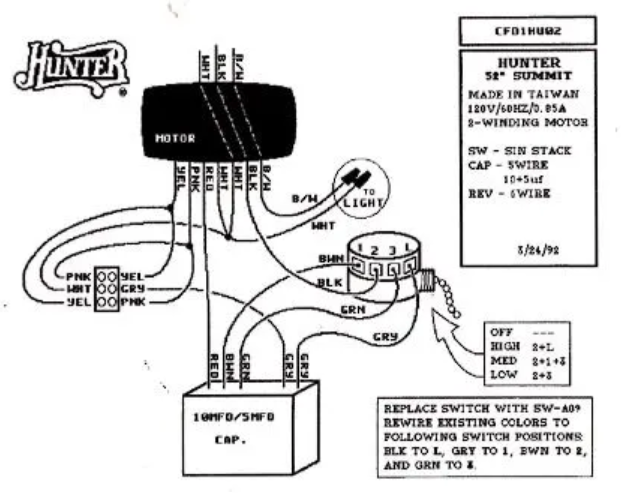
If your Hunter fan comes with an integrated light kit, you will need to connect the light wires in addition to the fan motor wires. Typically, the setup is as follows:
- The black wire connects to the fan motor.
- The blue wire is typically used to connect to the light kit.
- White wires (neutral) are common for both the fan and the light kit.
- The green or bare wire is used for ground connections.
When you wire the fan and light kit together, you should ensure that the light is wired to the same hot wire (black) or use the blue wire for the light separately, depending on the specific model.
These wiring diagrams for fans with light kits often come in the product manuals or can be found on the Hunter ceiling fan manuals section of the Hunter Fan website.
Hunter Ceiling Fan Wiring Diagrams for Advanced Features
Wiring for Remote-Controlled Ceiling Fans
For ceiling fans equipped with remote control functionality, the wiring setup includes an additional component – the receiver. The receiver connects to the fan motor and the remote, allowing you to control the fan speed and light settings from a distance. Here’s how you wire it:
- Receiver: The receiver connects to the hot wire from the ceiling (black) and is powered by the white neutral wire.
- Fan Motor: Connect the black wire from the fan to the corresponding receiver wire.
- Light Kit: If you have a light kit, connect the blue wire to the receiver and hot wire from the fan.
Remember to check your Hunter ceiling fan remote for model-specific instructions. The wiring diagram will vary depending on whether you’re using a wall switch, remote, or smart control system.
Smart Fan Wiring for Wi-Fi Enabled Fans (SimpleConnect)
If your Hunter fan has Wi-Fi functionality (like the SimpleConnect feature), the wiring is very similar to that of remote-controlled models, but with additional steps for integrating the fan into your smart home system. The primary difference lies in the receiver that allows the fan to connect to your Wi-Fi network.
- Wi-Fi Receiver: Install the receiver in the same manner as the remote-controlled model, with a connection to the hot and neutral wires.
- Smart Integration: After installation, the fan connects to your home Wi-Fi network, allowing you to control the fan via an app, Alexa, or Google Home.
If you need help with this process, check out our Hunter SimpleConnect smart ceiling fans post for a detailed guide.
Common Wiring Issues and Troubleshooting
While wiring your Hunter ceiling fan, you may encounter a few common issues. Here are some troubleshooting tips:
- Fan not turning on: Double-check your wiring connections. Make sure the hot wire is properly connected to the fan and light kit.
- Light not working: If the fan works but the light doesn’t, ensure that the blue wire is connected correctly to the light kit.
- Fan speed issues: If the fan operates but the speed isn’t right, check the remote control receiver or verify the wire connections for the motor.
If you encounter issues, be sure to refer to our article on Hunter Ceiling Fan Troubleshooting for further guidance.
How to Access and Read Hunter Ceiling Fan Wiring Diagrams
You can easily access Hunter ceiling fan wiring diagrams from several sources:
- Hunter Ceiling Fan Website: Navigate to the parts and manuals section to find the wiring diagram for your specific fan model.
- Manuals: Check the manual provided with your fan or available online.
- Hunter Ceiling Fan Manuals: For easy access to wiring diagrams and more detailed instructions, visit our Hunter ceiling fan manuals page.
Conclusion
Understanding the wiring diagram of your Hunter ceiling fan is crucial for ensuring a safe and efficient installation. Whether you’re wiring a basic model, adding a light kit, or setting up a remote-controlled or smart ceiling fan, following the correct wiring instructions will prevent issues and ensure your fan runs smoothly. Always ensure that you’re using the appropriate diagram and that the wiring matches the manufacturer’s instructions.
For more information on wiring Hunter ceiling fans, check out our detailed guides on wiring a Hunter ceiling fan with light kit and Hunter ceiling fan troubleshooting.
Leave a Reply